

Comparison · Updated
Rise Mission vs the iPhone Clock app: when the built-in alarm isn't enough
We make Rise Mission, so here is the honest version: for most people the free Clock app is the right alarm. This page is about the mornings when it isn't.
Keep the iPhone Clock app if you wake up on the first ring; switch to Rise Mission if you stop or snooze it half-asleep. Clock is free, preinstalled and rings on Silent. Rise Mission also rings on Silent, but asks you to finish a wake-up challenge first, such as camera-counted push-ups. It needs iOS 26 and Pro.
How do Rise Mission and the Clock app compare?
The table below uses Apple's own support page for the Clock column and the live App Store version of Rise Mission for ours. Rows where Clock wins are not hidden.
| Feature | iPhone Clock app | Rise Mission |
|---|---|---|
| Price | Free, preinstalled on every iPhone | Free download · Pro unlocks the app |
| iOS version | Every iPhone | iOS 26 or later (built on AlarmKit) |
| How you stop it | One tap on Stop | Finish a wake-up challenge (the iOS Stop button is still there) |
| Snooze | On or off per alarm, with a Snooze Duration you choose | Optional and limited per alarm; Snooze Tax makes each snooze cost more |
| Rings on Silent / Do Not Disturb | Yes, per Apple | Yes, AlarmKit alarms break through Silent and Focus |
| Set by Siri | Yes | No, set it in the app |
| Wake-up challenges | None | 10, from push-ups to math |
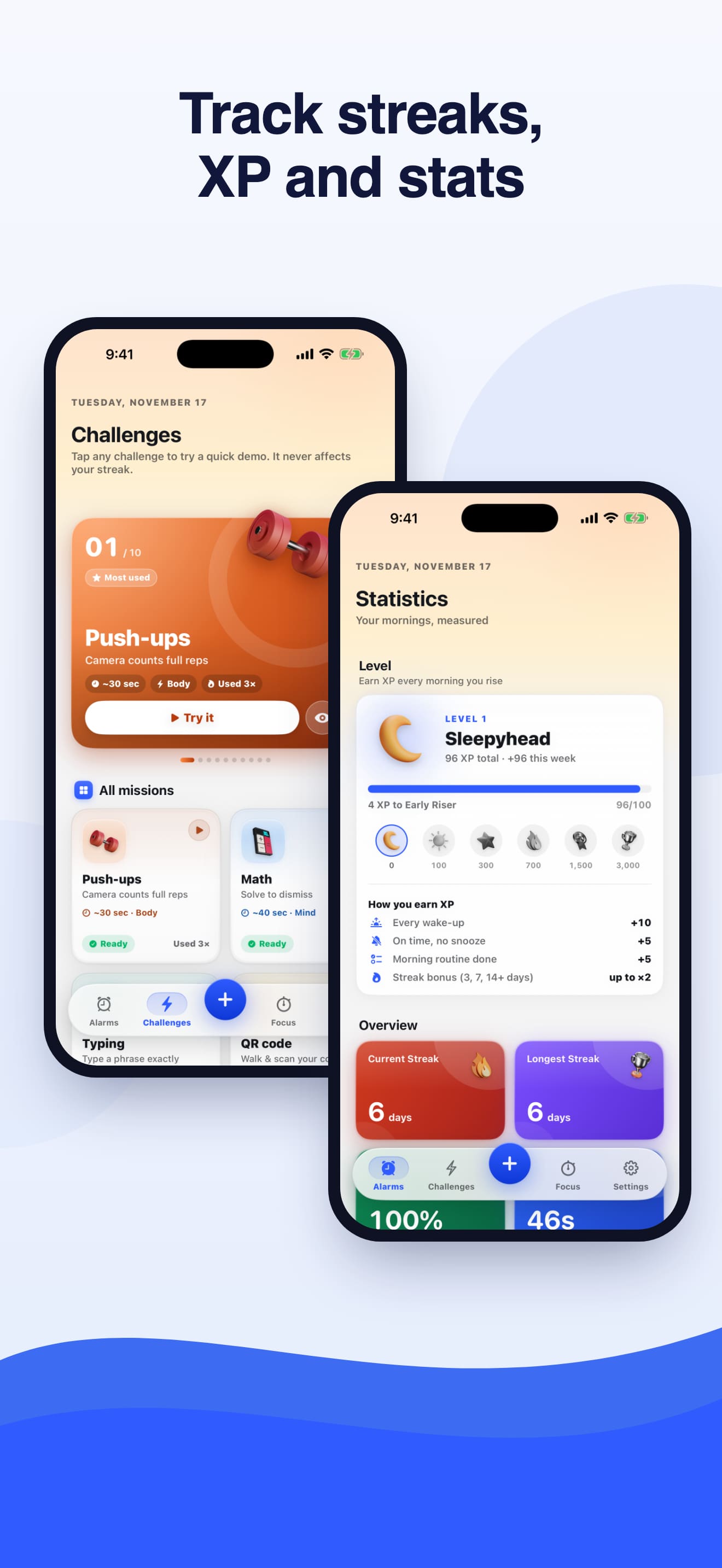
| Wake-up history & streaks | No | Yes: streaks, levels and XP, 15 achievements, completion rate, snoozes per wake-up |
| Account / ads | No account, no ads | No account, no ads (usage analytics, not linked to you) |
What does the iPhone Clock alarm do well?
More than people give it credit for. According to Apple, each Clock alarm can repeat on chosen days, carry a label, play a sound you pick, and show a Snooze option with a Snooze Duration you set. You can also ask Siri to set one (Apple Support). Apple is explicit that Do Not Disturb, the Ring/Silent switch and Silent mode don't affect the alarm sound, so the alarm still sounds when your phone is muted. We cover the details in does the iPhone alarm ring on Silent?
It also costs nothing, needs no download, works on every iPhone and never asks you to sign up for anything. If your alarm already gets you out of bed, none of the features below are worth paying for.
Where does the built-in alarm fall short?
In one place: it trusts whoever presses the button. Stop is a single tap and Snooze is a single tap. Both are easy to do with your eyes half-closed, and the part of your brain that would object isn't fully online yet. That groggy window has a name, sleep inertia, and it explains why so many people turn an alarm off with no memory of doing it.
Clock also keeps no record. It can't tell you that you snoozed four times on Tuesday or that you've got up on time nine mornings in a row. If you're trying to change a habit, that feedback loop is missing. If an alarm doesn't sound at all, that's a different problem; start with why an iPhone alarm doesn't go off.
What does Rise Mission add on top of Clock?
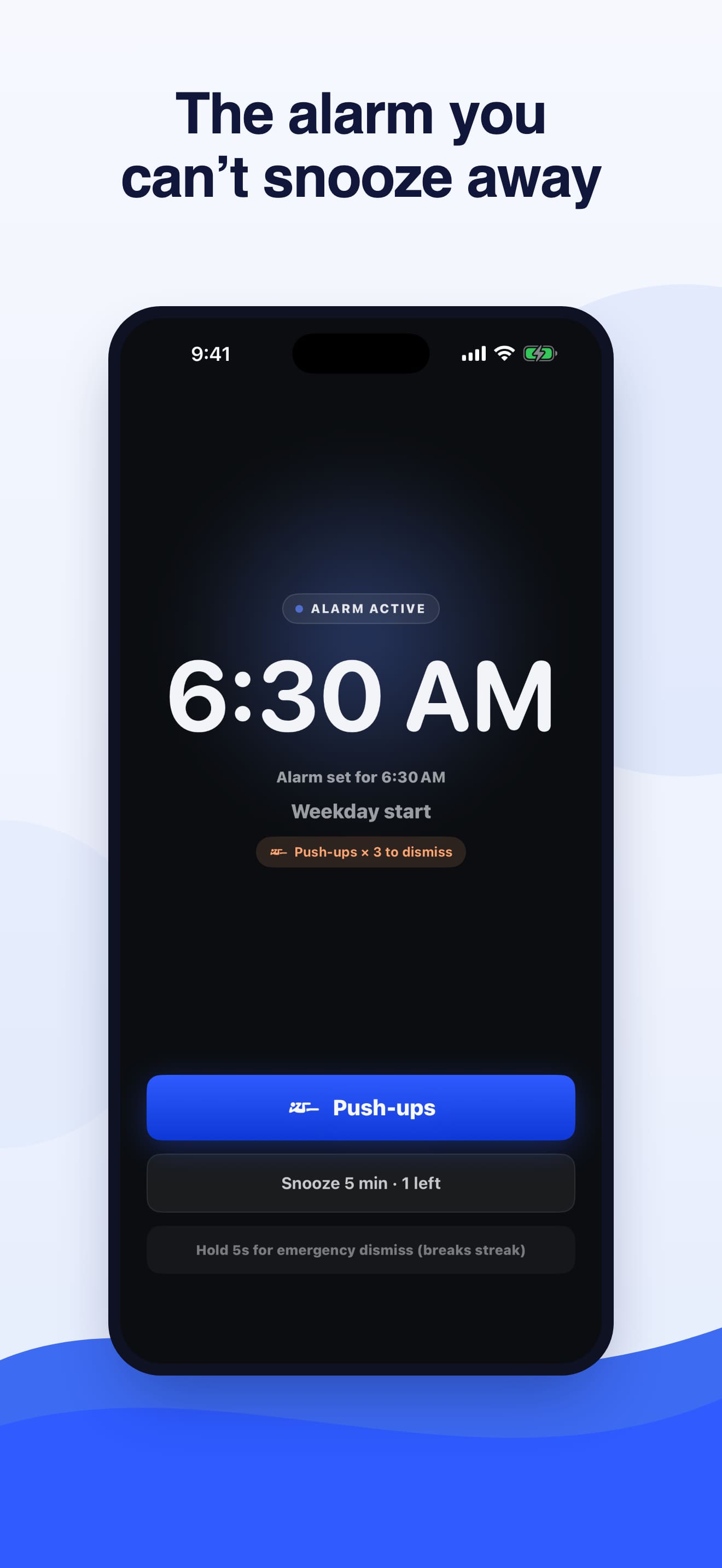
A step between the alarm and going back to sleep. When a Rise Mission alarm rings, you tap Start Challenge and finish a task you chose the night before. There are 10: body challenges (Push-ups, Squats, Walk, Shake, Object Find, QR code) and brain challenges (Voice, Math, Typing, Memory). Finishing one takes either your feet on the floor or a working brain, so by the time it's done, you're awake.
Around that core, the live version adds:
- Limited snooze with Snooze Tax. Snoozing is optional and limited per alarm. With Snooze Tax, each snooze adds to your next wake-up challenge, so snoozing gets more expensive.
- A record of every morning. Streaks, completion rate and snoozes per wake-up, so you can see whether it's working.
- A fair backup. Every physical challenge has a mental backup that takes over if the camera can't see you or a sensor isn't available.
- A safe way to practise. A test alarm rings about ten seconds after you lock the phone, so you can try the full flow safely before tomorrow morning.
- Morning Briefing with the weather and your first calendar event.
- Lock Screen widgets and Live Activities.
- Streak Shields that protect your streak on a rough morning.
Camera challenges stay on the phone: Push-up, squat and object recognition run on-device with Apple's Vision framework; frames are analysed in memory and discarded. See which wake-up challenge suits you for help choosing.
Can you just turn a Rise Mission alarm off?
Yes, and we'd rather you hear it from us. iOS shows a system Stop button on every alarm, including Rise Mission's, so you can always stop it without the challenge. Rise Mission is a commitment device, not a lock: a wake-up stopped that way isn't counted as a completed challenge. That isn't something an App Store alarm can change: iOS presents alarms from apps built on Apple's AlarmKit with its own system controls (Apple Developer). An emergency dismiss (hold for five seconds and confirm) is always available, so a ringing alarm can never trap you. It breaks your streak unless a Streak Shield absorbs it.
So the honest difference from Clock is not that Rise Mission is impossible to stop. It's that stopping it properly takes a deliberate choice instead of a reflex, and skipping the challenge shows up in your history. For a lot of people, that is enough friction to break the snooze habit. If you need a physical barrier, put the phone across the room or use a QR code in another room.
Who should stay with the Clock app?
- You already wake on the first alarm. There is nothing to fix.
- Your iPhone can't run iOS 26. Apple lists the iPhone 11 and later, plus the iPhone SE (2nd generation) and later, as compatible with iOS 26 (Apple). Older phones can't install Rise Mission.
- You don't want to pay for an alarm. Rise Mission is free to download, but Pro unlocks the app. Clock is free forever.
- You need hands-free setup. Clock alarms can be set by Siri; Rise Mission alarms are set in the app.
Who is Rise Mission for?
- Chronic snoozers. If you hit Snooze more than once most mornings, the snooze calculator shows what that costs you in a year.
- Heavy sleepers who switch off alarms without remembering it. Start with how to wake up as a heavy sleeper.
- People with mornings that matter: early shifts, flights, classes or workouts, where waking up on the first alarm is the whole point.
If you're comparing paid alarm apps rather than Clock, read the best alarm apps for heavy sleepers or Rise Mission vs Alarmy.
How do you switch from Clock without risking a late morning?
- Install Rise Mission, allow alarms when it asks, and pick a challenge you can do in your bedroom.
- Run the test alarm tonight. A test alarm rings about ten seconds after you lock the phone, so you can try the full flow safely before tomorrow morning.
- Keep your Clock alarm, but move it ten minutes after the Rise Mission alarm as a safety net.
- After a week of on-time mornings, turn the Clock alarm off. Line your alarm up with a full sleep cycle using the sleep calculator.
Sources

FAQ
Questions, answered
Is an alarm app better than the iPhone's built-in alarm?
Only if the built-in alarm isn't working for you. If you wake on the first ring, the Clock app is free, preinstalled and reliable. If you tap Stop or Snooze without really waking up, an app that asks you to do something first, like Rise Mission's wake-up challenges, fixes the specific problem Clock can't.
Can I stop a Rise Mission alarm without doing the challenge?
iOS shows a system Stop button on every alarm, including Rise Mission's, so you can always stop it without the challenge. Rise Mission is a commitment device, not a lock: a wake-up stopped that way isn't counted as a completed challenge.
Does Rise Mission ring on Silent like the Clock app?
Yes. Built on Apple's AlarmKit, so alarms ring on the Lock Screen, in Silent mode and during Focus, even when the app is closed. A powered-off iPhone can't ring. No alarm app can change that.
Can I use Rise Mission and the Clock app together?
Yes, and for important mornings in your first week we recommend it: keep a Clock alarm set ten minutes after your Rise Mission alarm as a backup, then delete it once you trust the new routine.
Which iPhones can run Rise Mission?
Rise Mission runs on iPhone with iOS 26 or later, because it's built on Apple's AlarmKit. There is no Android or iPad version. If your iPhone can't update to iOS 26, the Clock app is still the right alarm for it.
How much does Rise Mission cost compared with Clock?
The Clock app is free. Rise Mission is free to download, and Rise Mission Pro unlocks the app after onboarding. Pro is an auto-renewable subscription or a one-time Lifetime purchase. The options and prices for your country are shown in the app before you buy.
Keep Clock as your backup. Try a morning you can't sleepwalk through.
iPhone · iOS 26 or later · Free download · Pro unlocks the app